Engineering Journal
Case Study: Unified Ticketing Platform with Floating HelpEx Widget Across PHP and React Apps

Context
Support operations were spread across multiple channels and applications. Teams logged bugs and CRs in different formats, and context was often missing when users reported issues from live screens.
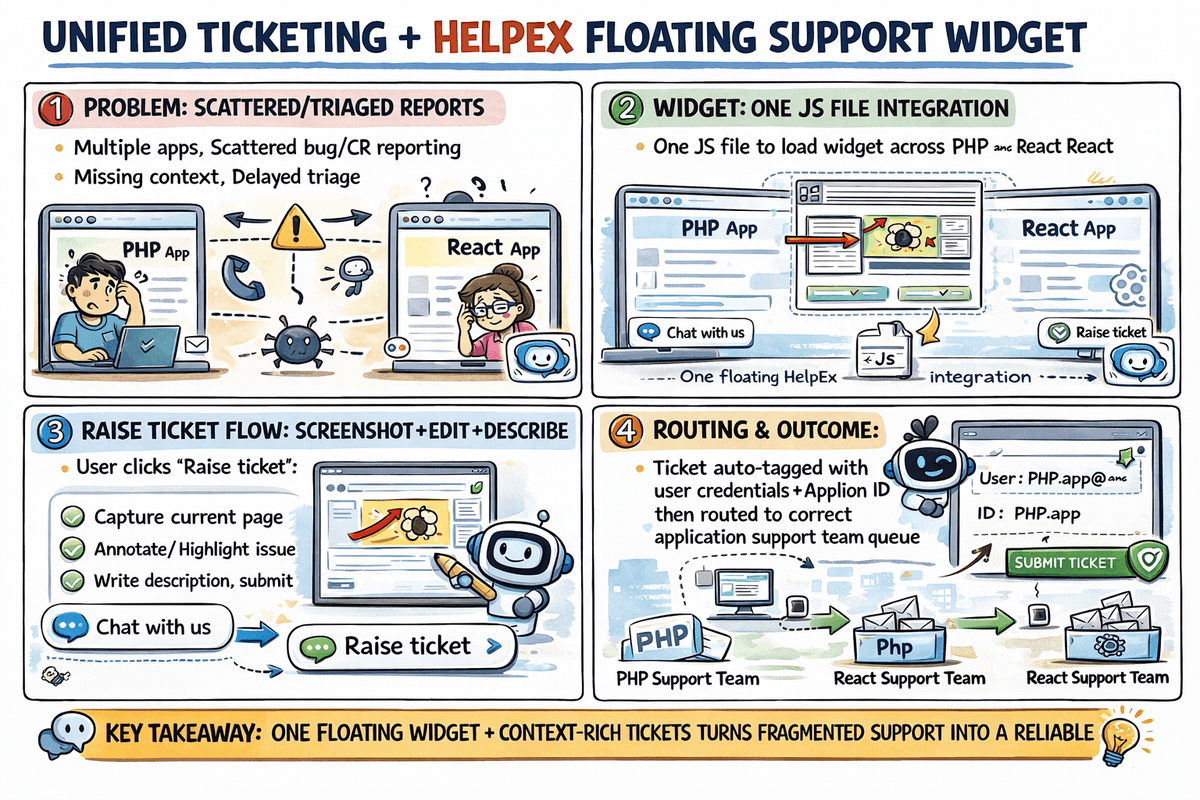
At the same time, our application landscape included both PHP and React frontends, so we needed a support entry point that could be adopted consistently without rewriting each app.
Objective
Build a single support platform that can:
- capture bugs and CRs from all applications,
- provide a universal floating support widget with minimal integration effort,
- allow users to raise contextual tickets with annotated screenshots,
- and auto-route each ticket to the correct support team using application ID.
Solution Overview
We designed a centralized ticketing tool and a floating HelpEx widget that is embedded in each frontend by adding one JavaScript file.
This gave us a common support experience in both PHP and React applications while preserving per-application routing and ownership.
Key Features Implemented
1. One-File Frontend Integration
- A single JS include injects a floating launcher icon at the right-most bottom corner (similar to chat support widgets).
- Works across heterogeneous frontend stacks (PHP and React).
- Avoids per-app custom UI development for support entry.
2. Dual Menu in Floating Widget
When users open HelpEx, they see two options:
- Chat with us
- Raise ticket
This supports both quick conversation and structured issue logging from the same entry point.
3. In-Context Ticket Capture with Screenshot Editing
For "Raise ticket", users can:
- capture current page screenshot,
- annotate/edit the screenshot,
- describe the issue,
- and submit directly.
This significantly improves triage quality by attaching visual proof with exact UI context.
4. Identity and App Context Binding
- Widget session uses logged-in application user credentials.
- Captures source metadata such as application ID and current page context.
- Eliminates ambiguity around who reported the issue and from where.
5. Application-Aware Routing
- Every ticket is tagged with application ID at creation time.
- Routing rules automatically allocate the ticket to the corresponding application support team.
- Reduces manual dispatcher dependency and shortens response time.
Workflow
- User opens any integrated app (PHP/React).
- HelpEx floating icon is available on the page.
- User selects Chat with us or Raise ticket.
- If raising ticket, user captures and annotates screenshot, adds issue summary, and submits.
- Ticket is created in centralized platform with user and app metadata.
- Routing engine assigns to the target support team by application ID.
- Team handles ticket with complete context from first touch.
Architecture Highlights
- Frontend: universal JS widget injection for mixed tech stacks.
- Support Core: centralized ticketing backend for bugs and CRs.
- Identity Link: binds reporter from existing app credentials.
- Routing Layer: deterministic team assignment by app ID.
- Evidence Layer: screenshot upload + annotation payload.
Outcome
- Unified bug and CR intake across all applications.
- Consistent support UX independent of frontend framework.
- Higher ticket quality due to visual context and annotations.
- Faster assignment through automatic application-based routing.
- Better operational governance with a single support source of truth.
Why This Matters
The most valuable part of this implementation was not just "ticket creation". It was context-preserving support intake at scale across mixed application stacks.
By combining one-file integration, identity-aware context, annotated screenshots, and rule-based routing, we turned fragmented support handling into a predictable operational system.