Engineering Journal
Case Study: AI-Powered Tech Pack Extraction with RPA, ChatGPT, and a Configurable Label Builder

Context
Our client — a Bangladesh-based garment sourcing operation — receives tech packs from buyers as part of every new style development cycle. A tech pack is a multi-page PDF specification document covering everything a factory needs to manufacture a garment: construction details, fabric compositions, BOM (bill of materials), measurements, trims, color standards, print placements, care labels, and packing requirements.
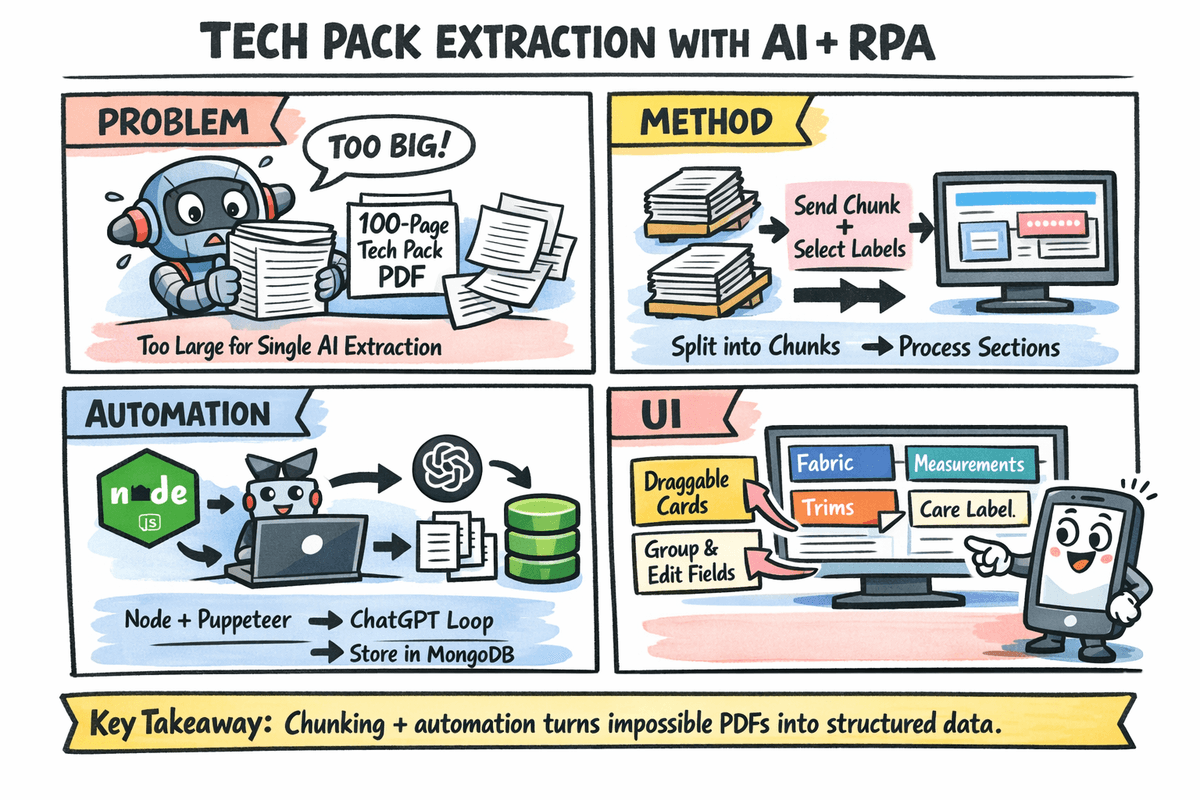
The business challenge was straightforward: their merchandising team spent significant time manually reading through each tech pack to extract specific data fields — measurements, fabric specs, color codes, label instructions — and re-entering them into their sourcing application. The goal was to automate this extraction and present it in a structured, editable workspace.
The Technical Problem: PDFs Too Large for any LLM API
The first attempt was obvious — send the tech pack PDF to an LLM API and ask it to extract the required fields. But tech packs from buyers routinely run 40–120 pages with embedded images, spec diagrams, and tables. No LLM API — not OpenAI, not Anthropic — could accept the full document in a single call due to:
- Context window limits: even with large-context models, multi-hundred-KB PDFs exceeded practical input sizes
- Token cost: processing a full tech pack per API call at commercial rates adds up quickly when doing this for hundreds of styles per season
- Image-heavy content: many spec tables are rendered as images, not text — native PDF parsing alone isn't sufficient
Solution Architecture
We broke the problem into three distinct layers:
Layer 1 — Label Definition (User-Controlled)
Before any extraction runs, the user defines which fields they want. This is the label builder: a simple UI where the merchandiser lists data points they care about — e.g., Fabric Composition, Measurement Chart, Trim List, Color Standard, Care Instructions, Packing Method.
These labels are stored per client/style in MongoDB and form the extraction contract for every subsequent call.
Layer 2 — PDF Chunking + RPA Extraction Loop
Since the tech pack can't be sent in one shot, the backend:
- Parses the PDF page by page and groups every 3 pages into a chunk with the text content extracted
- For each chunk, it builds a prompt: the extracted text + the list of user-defined labels + an instruction to only return relevant data for those labels found in this section
- A Node.js + Puppeteer script then:
- Opens the ChatGPT web interface (free tier, no API billing)
- Pastes the prompt
- Waits for the response
- Scrapes the response text
- This runs sequentially for every 3-page chunk across the full document
- Results from all chunks are merged and de-duplicated — if the same label appears across multiple sections (e.g., measurements often span 2–3 pages), the values are combined intelligently
Using Puppeteer to automate the ChatGPT web UI — rather than the paid OpenAI API — reduced per-document extraction cost to zero. For a sourcing operation processing hundreds of styles per month, this was a meaningful operational decision.
Layer 3 — Draggable grouped and Extraction Workspace
Once extraction is complete, the results are surfaced in an interactive workspace UI:
- Each extracted label appears as a card with its extracted value
- Cards are draggable — the merchandiser can move them around to match their preferred review order
- Cards can be grouped — e.g., drag all measurement-related cards into a "Measurements" group, trim and BOM cards into a "Materials" group
- Values can be edited inline if the AI missed something or the merchandiser wants to annotate
The final structured output is saved to MongoDB against the style/tech pack record, making it retrievable for downstream use in the sourcing application (purchase orders, factory communications, spec sheets).
System Flow Summary
Tech Pack PDF Upload
    │
    â–¼
PDF Parser → chunks every 3 pages
    │
    â–¼ (for each chunk)
Node.js + Puppeteer → ChatGPT Web UI
    │   Pastes prompt (chunk text + label list)
    │   Waits for response
    │   Scrapes extracted values
    â–¼
Response Accumulator → merge all chunks
    │
    â–¼
MongoDB: save extraction per label per style
    │
    â–¼
Draggable Groupable Workspace UI
    │
    â–¼
User reviews, edits, groups, confirms
    │
    â–¼
Final structured record saved to MongoDB
Engineering Decisions Worth Calling Out
Why Puppeteer over the OpenAI API? At scale, API costs would have been unsustainable for a client doing hundreds of styles per season. The ChatGPT web interface is free for standard use. Puppeteer provided a reliable automation layer that could mimic the browsing session and extract responses programmatically. The tradeoff was reduced parallelism (browser sessions can't scale as easily as API calls), but for their volume, sequential processing per chunk was acceptable.
Why chunk at 3 pages? Three pages was calibrated empirically. It was small enough that ChatGPT reliably parsed the full chunk without truncating the response, while large enough to keep the number of RPA iterations manageable for a 60-page doc (~20 iterations).
Why MongoDB for storage? Tech pack data is inherently semi-structured and varies per buyer's format. MongoDB's document model let us store extraction results without schema migrations every time a new label type was introduced. The label set and extracted values live as a flexible document per style.
Outcome
- Merchandisers no longer manually re-type spec data from tech packs
- Extraction turnaround went from 30–45 minutes of manual reading to an automated pipeline
- The label builder gives the team control — new extraction targets can be added without developer intervention
- The draggable workspace removed friction from the review step — grouping and reordering lets each merchandiser work in their preferred mental model
- The system is live and deployed, actively processing incoming styles for the Bangladesh sourcing client
Stack
| Layer | Technology |
|---|---|
| PDF Parsing | Node.js (custom PDF text extractor) |
| RPA / Browser Automation | Node.js + Puppeteer |
| AI Extraction | ChatGPT Web UI (automated via Puppeteer) |
| Backend API | Node.js |
| Database | MongoDB |
| Frontend | React (draggable / groupable workspace) |
Reflection
The most interesting architectural lesson here was treating a cost constraint as a design driver. The no-API Puppeteer approach is unconventional, but it was the right call for this client's volume and budget. The chunking logic, response merging, and sequential RPA loop made a genuinely hard problem — "extract structured data from a 100-page PDF" — tractable without any infrastructure cost beyond the server running the Node process.
The label-first design was equally important: by making extraction configurable per client, we avoided building a rigid extraction template. Each buyer's tech pack format is different. The same system can handle Zara's specs and H&M's specs without any code changes — just a different label definition.